CCTokenViz is a free, open-source Windows app that shows how much of Claude Code's context window you have left, per project, plus your 5-hour and weekly plan limits, in a small always-on-top window. It works with both the Claude Code terminal and the Claude desktop app, which has no status line of its own. Download the portable .exe or read the source on GitHub.
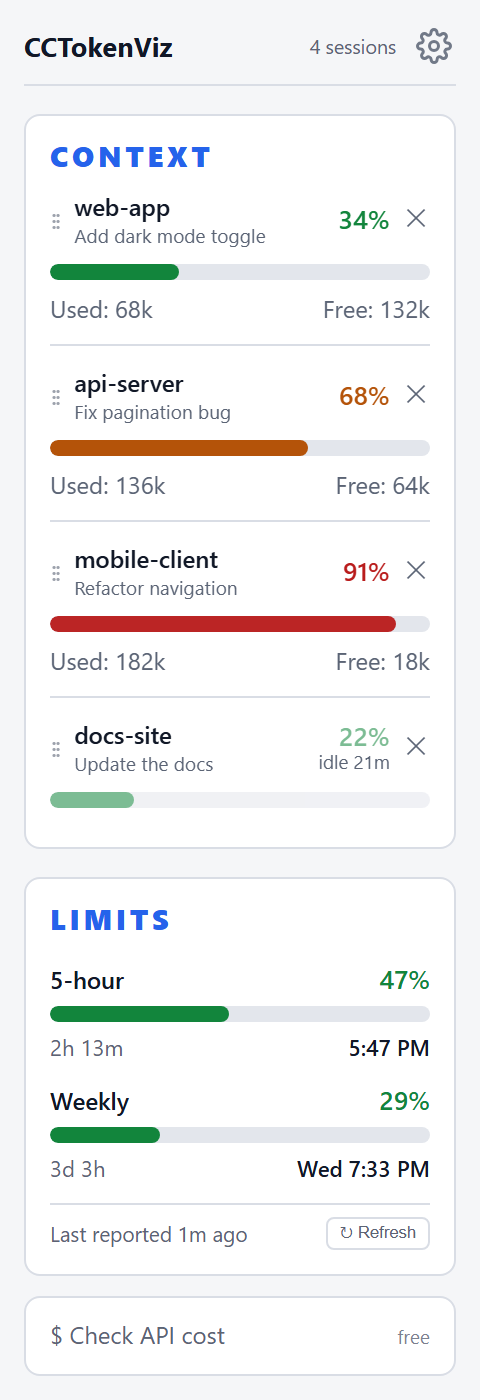
Key facts
- What it is: a lightweight desktop monitor for Claude Code, built with Go and Wails.
- Platform: Windows 10/11, single portable .exe, nothing to install. Other platforms build from source and are untested.
- Cost: free and MIT licensed. It forked from gosparq/claudewatch and is not affiliated with Anthropic.
- Data: reads Claude Code's local session logs in
~/.claude/projects/every two seconds. Nothing is uploaded. - Shows: context used and free per project, 5-hour and weekly limits with reset times, and an optional on-demand API cost estimate.
What problem does it solve?
Claude Code has a finite context window, 200k tokens or 1M on extended-context models, and a plan limit that resets every five hours and weekly. In the terminal a /statusline can keep context remaining on screen. The Claude desktop app has no status line; it shows context and plan usage when you click its usage ring, one session at a time. CCTokenViz keeps them in view instead: every active project's context use plus your 5-hour and weekly limits, in one small always-on-top window, for the desktop app and the terminal alike.
How do I see my Claude Code context usage?
- Download
CCTokenViz.exefrom the latest release and run it. - Open a project in Claude Code, in the terminal or the desktop app. Its row appears within a couple of seconds; there is nothing to register.
- Watch the bar: it moves from green to yellow to red as the window fills.
How do I see my 5-hour and weekly Claude limits?
Claude Code only reports plan usage (Pro and Max) to a status line command. CCTokenViz gets the numbers one of two ways:
- Status line export: a small script writes the status line data to a local file that CCTokenViz reads. It costs nothing, but only terminal sessions export.
- Automatic checking (opt-in): when you have had a real message in the last 30 minutes, CCTokenViz runs one headless Claude Code call of under 1,000 tokens (887 measured) to read both windows. On a subscription that takes a tiny slice of your quota; with an API key it is roughly $0.0002 a poll.
What are the system requirements?
- Windows 10 or 11. The release is a single portable .exe with nothing to install. It needs the WebView2 runtime, which Windows 10 and 11 ship with.
- Claude Code, in the terminal or the Claude desktop app (Code tab). Either one is enough, because both write the same session logs. CCTokenViz itself does not need the
claudecommand. - For the 5-hour and weekly limits (Pro and Max plans): the status line export works for terminal sessions only. Automatic limit checking runs the official
claudecommand, so the Claude Code CLI must be installed and signed in; it works for desktop-app users too.
Frequently asked questions
Do I need Claude Code, the desktop app, or both?
Either one is enough. The Claude Code terminal and the Claude desktop app's Code tab write the same session logs, which is all the context meter reads. Limits need extra: the status line export works for terminal sessions only, and automatic limit checking needs the Claude Code CLI installed and signed in.
Does CCTokenViz work with the Claude desktop app?
Yes. The desktop app's Code tab writes the same session logs as the terminal, so its sessions show up as rows. The status line export only works for terminal sessions.
Does it send my data anywhere?
No. It reads local files and runs on your machine. The optional limit check uses your own claude login and CCTokenViz never reads or stores your credentials.
Is it free?
Yes, MIT licensed. Automatic limit checks use a small amount of your own plan quota, described above.
Can it show what my Claude Code usage would cost at API prices?
Yes. A "Check API cost" button estimates tokens, cost at API list prices and what prompt caching saved, for today and the last 7 days. It reads local logs, is free, and is information only.
Which platforms are supported?
Windows 10/11 has a prebuilt portable .exe. macOS and Linux build from source with Go 1.21+ and the Wails CLI, but are untested.